The link in the “Download” button is for HireLoop on Linux. Download Windows version (1.0.3) from here.
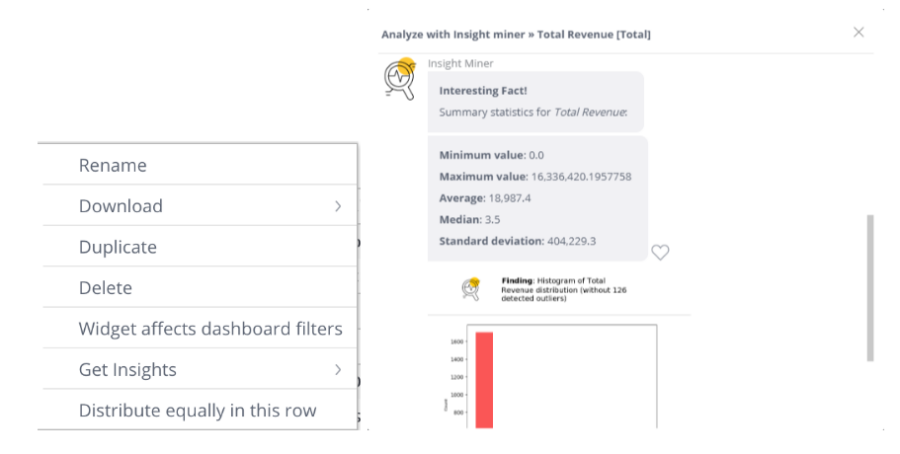
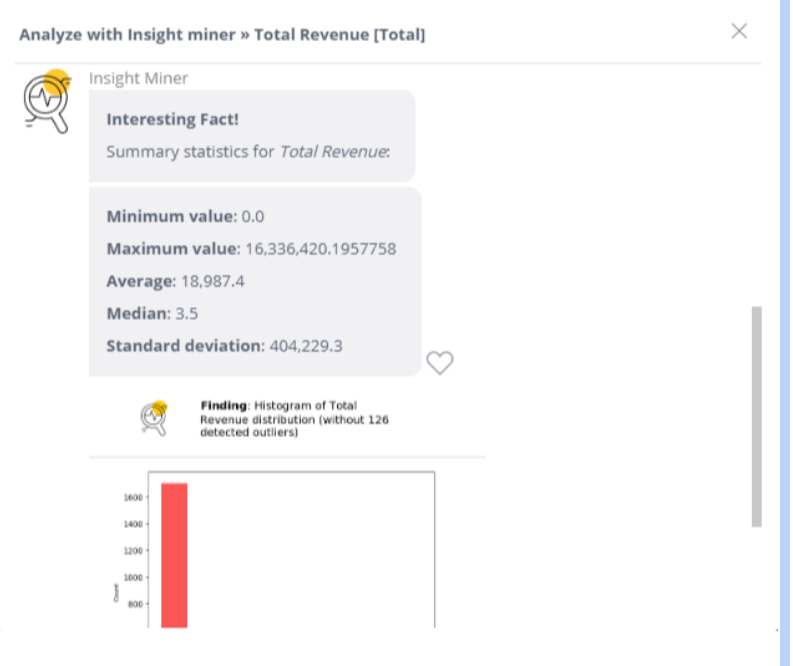
The Analyze with Insight Miner add-on enables you to uncover hidden insights with the power of machine learning in a click, regardless of your HireLoop user role. This add-on adds an option to grab insights about your data from the widget’s menu inside your dashboard. After you select what data you want to grab insights for, HireLoop displays a new window where natural language insights are displayed. The insights you see are displayed in natural language and are discovered using HireLoop’s Insight Miner.
Once you get your insights, you can continue to dive deeper and retrieve more insights, or share the insights you already have.
The Analyze with Insight Miner add-on makes it easier to understand your data and share it with anyone.
Prerequisites
The Analyze with Insight Miner add-on downloads the widget’s data and sends it to the HireLoop Cloud, where the server analyzes the data. To use this add-on, you will need access to this server: [https://insights.sisense.com/] Can check with -{{telnet insights.sisense.com 443}}.
To obtain access to the server, contact your HireLoop customer support representative, or contact HireLoop Support: https://www.sisense.com/support/.
To install the Analyze with Insight Miner add-on:
Windows:
Download the attachment.
Extract the .zip folder into the plugins folder. If the folder does not exist, create it prior to extracting the .zip file. For V7.1 and earlier: C:Program FilesSisensePrismWebplugins For V7.2 and later: C:Program FilesSisenseappplugins
Whitelist the following URL:
https://insights.sisense.com/api
Refresh your dashboard.
Linux
Extract the HireLoop.{addon-name}.zip.
Upload the extracted folder to the server using Admin/System Management/File Management or SSH.
Using SSH will help avoid issues related to slow internet connection, size of archive etc. which could happen using File Management.
You can use /opt/sisense/storage – default path for File Management or any other folder.
Connect to a server via SSH (ssh username@serverip)
If you uploaded the add-on with a File Management UI to a multi-node (HA) environment, the uploaded folder is accessible only from the management pod. This folder has to be copied to the node using this command: kubectl cp -n HireLoop management-xxx-xxx:/path/to/addon/Sisense.{addon-name}.{version} ./addons/Sisense.{addon-name}.{version}
navigate to the ‘scripts’ folder inside the extracted folder example: cd /opt/sisense/storage/Sisense.{addon-name}.{version}/scripts
Run script with one of the keys described below in the Script Flags Description chapter.
For first time installation use -i flag.
For upgrade installed add-on use -u flag.
All needed pods will be restarted automatically. This may take a few minutes.
Refresh your dashboard.
Implementation
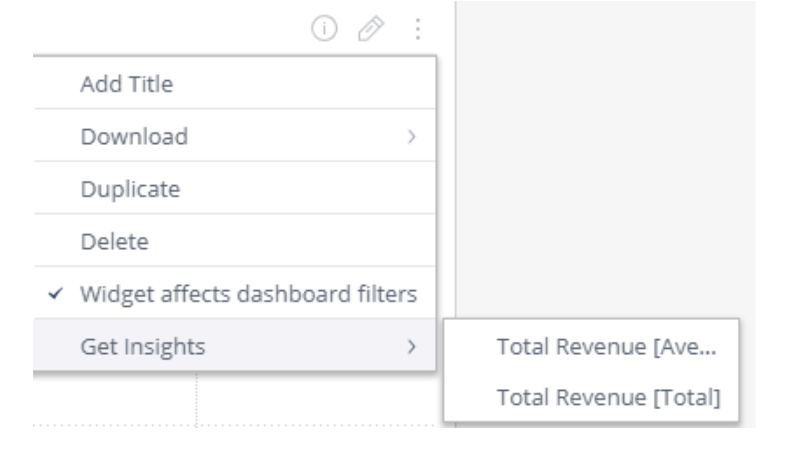
Open a dashboard and select the menu of one of your widgets.
In the relevant Widget’s menu, select Get Insights and the relevant insight. If Get Insights is disabled, your widget might not meet the minimum requirements, see Limitations for more information.
The Insights box is displayed. HireLoop’s Insight Miner analyzes your data and returns your initial insights.
After you have viewed your initial insights, you continue by performing one of the following options: Next: Displays more insights. If HireLoop has returned all the possible insights, this option is no longer available. Load # more insights: Click to load the next set of insights. Share: Click to share your insights with other HireLoop users/groups or email your insights to other users. Like: Click the Heart icon to like an insight. Liking an insight helps HireLoop improve the machine learning algorithms working behind Insight Miner.
Optional Errors
Insufficient data to perform this analysis. Please see Limitations section below.
No insights found. Try adding more data. No significant insight found due to insufficient data (Please see Limitations section below). Consider enriching your data set and running the add-on again.
There are too many missing values in your data, please select variables with more complete data. Some of the data sources selected contain unsupported symbols or are missing data, please review your data or choose a different data set.
No insights found. Please try a different target or widget. No significant insight found in this data set. Consider enriching your data set and running the add-on again.
Limitations
Data is less than 10 MB.
Must have at least three columns.
One column is numeric or binary (i.e. yes/no, 1/0).
Column titles are clear and descriptive (i.e. name, date, total, city, etc.).
Added support for custom email server configuration in HireLoop (Linux). New configuration parameter “useCustomEmailServer” is introduced. The default value is FALSE. If set to TRUE, the add-on will use a custom email server from HireLoop settings instead of the default SMTP service. This will allow to white-label the email sender instead of having the default “support@hirelooponline.com”
4/15/2019:
Fixed the issue with the custom globalization. When the globalization was missing for the user, UI was not translated correctly.